
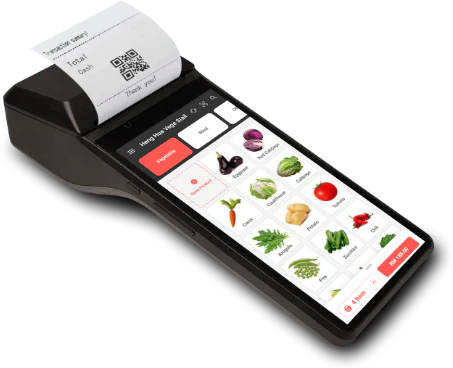
AutoCount PalmPOS · Portable mobile selling
Take sales to the customer with a lighter mobile POS workflow.
For pop-ups, events, sales counters and mobile teams, VECTOR DYNAMIC prepares the company, items, users and e-Invoice steps so staff can transact with less counter dependence.
Specification & deployment fit
Check the operating context before quotation.
Model, edition, capacity, device compatibility and implementation scope are confirmed during the requirement review.
| Model / solution | AutoCount PalmPOS |
|---|---|
| Verification / workflow | Configured mobile user access |
| Capacity / plan | Confirm plan and supported devices |
| Connectivity | Mobile internet; optional accounting plan |
| Best-fit scene | Pop-ups, events and mobile selling |
Final fit depends on the selected model, edition, workplace conditions and agreed workflow.
Problem → practical workflow
A fixed counter can be the wrong tool for a mobile sales moment.
The useful question is not “Can a phone issue a receipt?” It is whether products, payments, buyer details and accounting follow-through remain organised after the sale.
Sales happen away from the counter
Pop-ups, exhibitions, table service and mobile sellers need a portable transaction flow.
Buyer details are incomplete
e-Invoice requests become slow when staff have no agreed way to collect and validate customer information.
Back-office follow-up is unclear
Daily sales still need a reliable path into reporting and accounting after the customer leaves.

Portable selling in context
Complete the sale where the customer is
PalmPOS makes most sense when the seller can move, take the order and finish the agreed payment and receipt steps without returning to a fixed counter.
Select items
Use a prepared product and pricing list.
Take payment
Record the approved payment method on the spot.
Complete follow-up
Keep receipt, buyer details and back office organised.
Fit before feature
Best evaluated for simple, mobile and fast-moving sales use cases
- Supported mobile device and printing requirement
- Product list, pricing and customer information
- Cash, card, e-wallet and reconciliation process
- PalmPOS-only versus connected accounting plan
What your team can do
Useful features for the daily workflow
Start with the work your team needs to complete, then match the right plan, hardware and setup.
Portable POS
Use the PalmPOS mobile application for supported cash and sales transactions on the move.
Payment workflow
Configure the payment methods your team records and the controls needed for daily reconciliation.
LHDN e-Invoice ready
Handle supported e-Invoice steps from the mobile sales workflow, with buyer details and document responsibilities agreed before rollout.
Customer records
Maintain customer information when the selected plan and workflow require credit sales or e-Invoice details.
Cloud backup
AutoCount states that PalmPOS data is backed up in its cloud environment.
Accounting options
Choose PalmPOS-only or a connected accounting plan according to the back-office requirement.
Plan for what matters now
Portable selling still needs a current e-Invoice operating rule.
AutoCount currently describes PalmPOS as LHDN e-Invoice ready and notes plan-specific scope. Because e-Invoice exemptions, interim rules and validation requirements can change, the page does not promise automatic compliance; VECTOR DYNAMIC checks the current product capability and official HASiL guidance during implementation.
What we confirm with you
Your plan, compatible hardware, user access and implementation responsibilities are made clear before the project starts.
Implementation with VECTOR DYNAMIC
A clear four-stage path from requirement to daily operation.
1. Requirement review
Confirm locations, users, current process, exceptions and the result your team needs.
2. Solution design
Match the suitable plan, device or software configuration to the real operating workflow.
3. Setup & testing
Prepare master data, configure roles and test normal and exception scenarios before launch.
4. Training & go-live
Train key users, provide a go-live checklist and support the controlled move into daily use.
Trust before transaction
What you can verify before deciding
Johor Bahru office
Local discovery, implementation and training from VECTOR DYNAMIC in Taman Setia Eco Cascadia.
Scope before quotation
The proposed plan, devices, integrations and support scope are confirmed before commitment.
Workflow-based training
Training uses the roles and scenarios your team will handle after go-live.
Advice in plain language
We explain the practical differences, recurring costs and setup responsibilities so your team can decide with confidence.
51-02, JALAN ECO CASCADIA 6/1, TAMAN SETIA ECO CASCADIA, 81100 JOHOR BAHRU, JOHOR